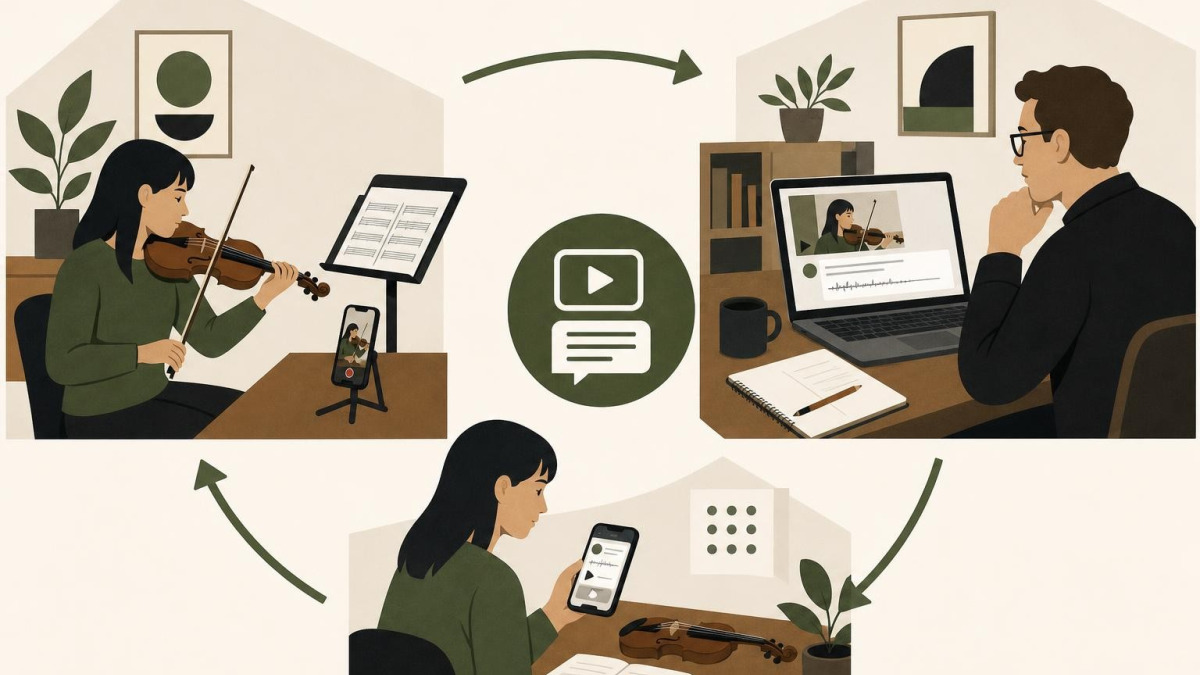
1. Start with a teaching problem—and a way to reach the people who have it
A useful niche app starts with a specific group and a recurring need. For independent music teachers, one possible opportunity is the gap between weekly lessons: learners practise on their own, but teachers may not see what happened until the next session. A practice-sharing app could give learners a place to submit progress and teachers a way to respond between lessons. There is a second question to answer before building: who needs this, and how will they discover it? Lily Ray’s post on X, published October 21, 2026, offered a personal perspective: some tools people recommend are tools she would rather build herself. That is an individual view, not market research. For a creator, it is a useful reminder to test the need with the intended audience as well as shape the software. Talk with a few teachers and learners you can reach. Ask what happens between lessons, where practice gets stuck, and what kind of feedback would actually help. Look for repeated needs rather than treating one person’s preference as proof of demand. Then write a simple promise for the app, such as: “Help learners share practice progress and get useful teacher feedback between lessons.”
- Name the first audience precisely: for example, independent teachers who give regular one-to-one lessons.
- Ask about their current practice and feedback routine before proposing screens or features.
- Identify how you could reach a small group of potential users to discuss or try the idea.
2. Design one clear learner-to-teacher loop
Illustrative example—not a description of an existing KAXXIS app: a first version could let a learner submit a short practice update, let the teacher respond with feedback, and show progress over time. These are proposed product features, not ready-made functionality. Keep the first version focused on a loop that both sides can understand: the learner shares something, the teacher responds, and the learner can see what to work on next. Decide what “submission” means for this audience. It might be a note, a practice goal, or another format agreed with users; do not assume that any particular media or integration is available without confirming it. KAXXIS describes business modules as the place for an application’s project-specific screens, workflows, data model and integrations. That makes the platform relevant to a creator shaping a purpose-built experience, rather than expecting a general platform catalogue item to be a finished teacher product. (Evidence: 5)
- Write down the learner’s action, the teacher’s response and the learner’s next step.
- Choose the minimum information each person needs to complete that loop.
- Ask teachers whether progress views would help them respond, and what they would actually want to see.
3. Turn the idea into a small, testable module
Once the user loop is clear, describe it in everyday language before deciding how to build it. List the screens each person needs, the steps they take, the information the app keeps and any outside services it must connect to. Treat these as requirements to investigate, not assumed platform features. KAXXIS provides a foundation and a build kit intended to help creators create, license, translate, deploy and upgrade application modules. Its site also invites prospective creators to describe the business application they need and points them toward information about what is already built and how modules deploy. (Evidence: 70265, 70266, 70267) For the illustrative practice-sharing app, that means a creator could explore how to develop a module around learner submissions, teacher feedback and progress views. The build kit is the supported connection; the specific music-teaching features would still need to be designed and developed for the intended users. If you use AI as part of your development process, treat that as a tool choice—not evidence that the resulting app includes AI features.
- Draft a one-page description of the audience, problem and core user loop.
- List proposed screens, steps and data; mark integrations as questions until confirmed.
- Explore KAXXIS’s module information to understand the foundation and build-and-deploy approach.
4. Plan access and data alongside the experience
An app that serves several teachers and their learners needs clear decisions about who can see and change each record. For the example, decide whether a learner’s practice update is visible only to that learner and their teacher, and what happens if a learner changes teachers. These are proposed product requirements to agree and test; they are not claims about a finished feature. This is worth considering early, not as a last-minute technical detail. KAXXIS’s developer walkthrough calls for endpoint authorisation and tenant-scoped record queries, and recommends testing that one tenant cannot read or update another tenant’s records. That guidance is relevant when planning an application with separate customer groups, but it does not mean a proposed app’s access rules are already configured. (Evidence: 10) Also identify any external services you expect to use. KAXXIS states that hosting, AI subscriptions, external provider usage, payment integrations and bespoke development are separately configured or scoped. Confirm which of these apply to your actual design rather than assuming they are part of a standard build. (Evidence: 6)
- Map each user type to the records they should be able to view or change.
- Include cross-account access checks in the test plan if the application serves multiple customer groups.
- List external services and hosting needs that must be clarified for the project.
5. Check the first version, then invite the right next conversation
Before treating the idea as ready to offer, walk through the core loop with representative teachers and learners. Can a learner share progress? Can the intended teacher respond? Can the learner understand what to do next? Check that each person sees only the records intended for them. Record what confused users and adjust the requirements before expanding the feature list. For the build and release side, KAXXIS describes a licensed runtime and Module SDK, with deployment scope, support and updates agreed in the proposal. Its developer walkthrough recommends building the unmodified starter before making changes, helping separate setup issues from later code changes. On a managed host, the documented release process involves an authorised operator staging a reviewed module release, followed by a controlled host restart; module code is trusted in-process code and needs review. (Evidence: 4, 9, 11) A sensible next step is to explore KAXXIS’s module and deployment guidance, then describe the audience, the user loop and the requirements you still need to confirm. That gives you a more concrete basis for deciding whether this practice-sharing concept—or another niche application—is worth developing for the people you want to serve.
- Test the core learner-to-teacher loop and revise it based on what users find unclear.
- Review the deployment guidance and clarify the project’s deployment, support and update scope.
- Take a concise application brief into a conversation about the module you want to create.
News sources
- Webflow vs Vibe Coding: Which Is Better for a B2B SaaS Website? | ViDesigns – Webflow Agency — published 2026-10-26T12:22:30+00:00
- Lily Ray — published 2026-10-21T02:59:15+00:00
- Marc Lou on X: "Software is having its Uber moment. For years, SaaS companies could keep raising prices because building an alternative was too expensive. AI changes that. Now anyone can enter the market with a competitive pricing. And customers can vibe code a good-enough version themselves." / X — published 2026-10-20T03:29:25+00:00