THE MODULAR SAAS PLATFORM · .NET / BLAZOR
Tell your AI
what business application you need.
KAXXIS provides the foundation, and the build kit helps you create, license, translate, deploy and upgrade it.
FOR DEVELOPERS · AGENCIES · AMBITIOUS BUSINESSES
LEATHERIQ · BUILT ON KAXXIS
● ● ● LEATHERIQ / RECIPE DESIGNER
One platform. Connected modules. Familiar navigation.
One SaaS platform. Your business modules. A repeatable path from code to deployment.
.NET
Blazor
PostgreSQL
Module SDK
Your AI tools
BUILT ON KAXXIS / LEATHERIQ
This is what a platform
can become.
A specialist business suite with visual design tools, operational insight and detailed working screens. LeatherIQ shows the kind of product you can build on the KAXXIS foundation.
SPECIALIST TOOLS / HIDE STUDIO
Your industry.
Your workflow. Your canvas.
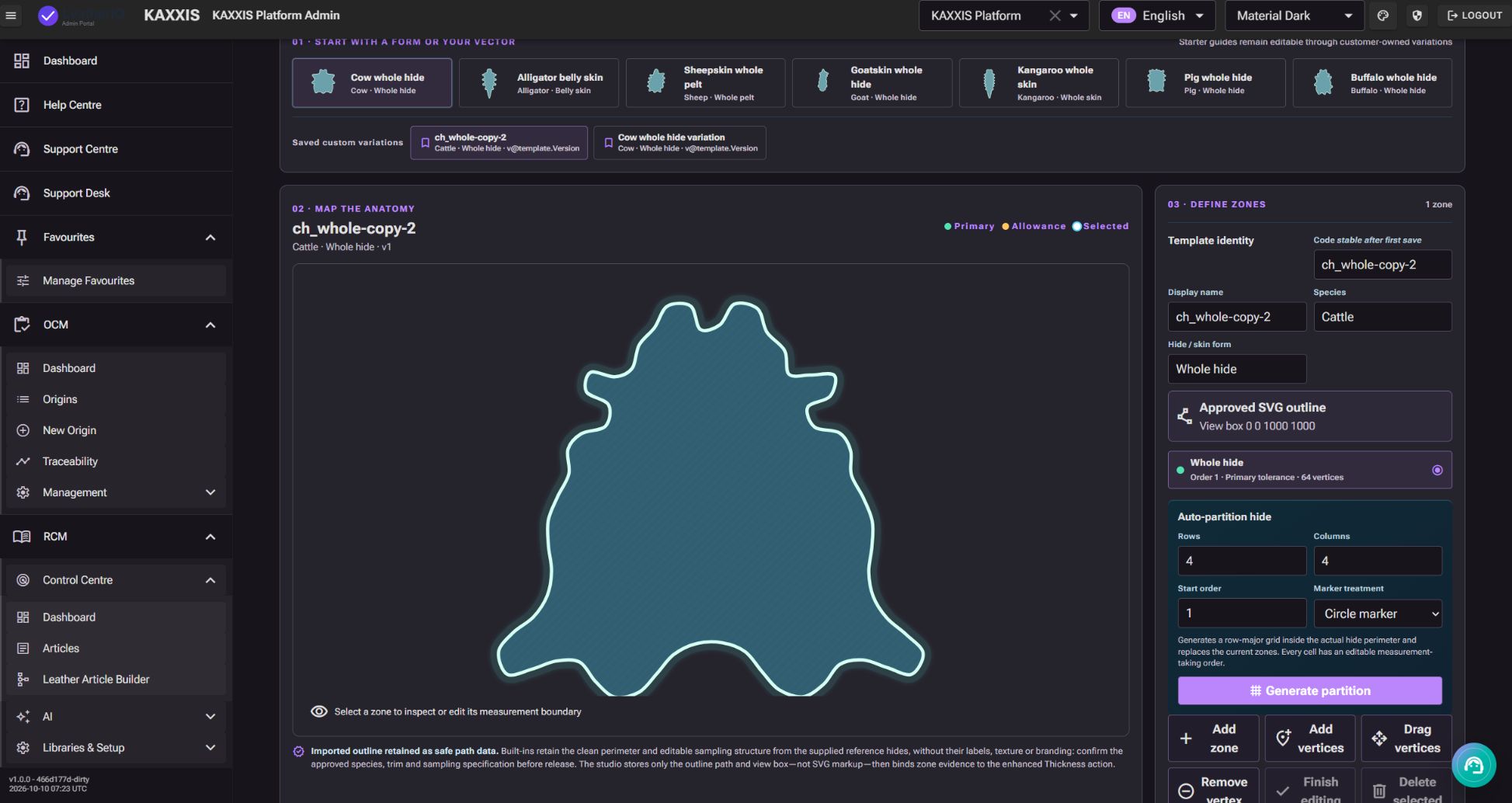
Go beyond standard forms. LeatherIQ Hide Studio combines vector geometry, measurement zones and specialist controls in one workspace. Build the interface your business needs, with KAXXIS providing the surrounding SaaS foundation.
Full KAXXIS menus in every screen. Click to inspect the detail.
● ● ● LEATHERIQ / HIDE STUDIO
01 / VISUAL WORKFLOWS
Complex work.
A visual way to build it.
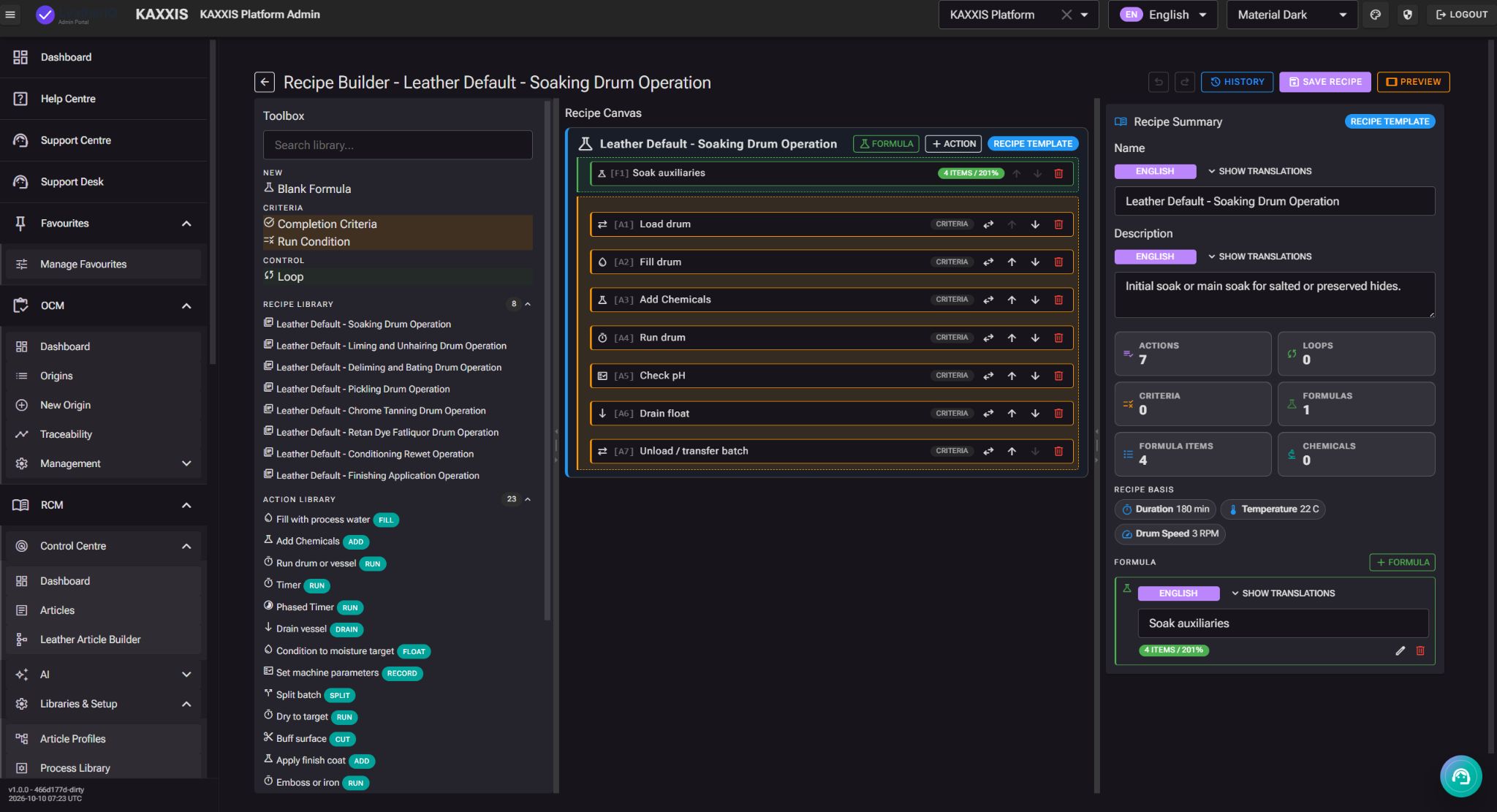
The LeatherIQ recipe designer brings an action library, a working canvas and editable parameters together. A specialist interface for a specialist workflow—running inside the shared platform.
Click a screen to explore it at full size.
● ● ● LEATHERIQ / RECIPE DESIGNER
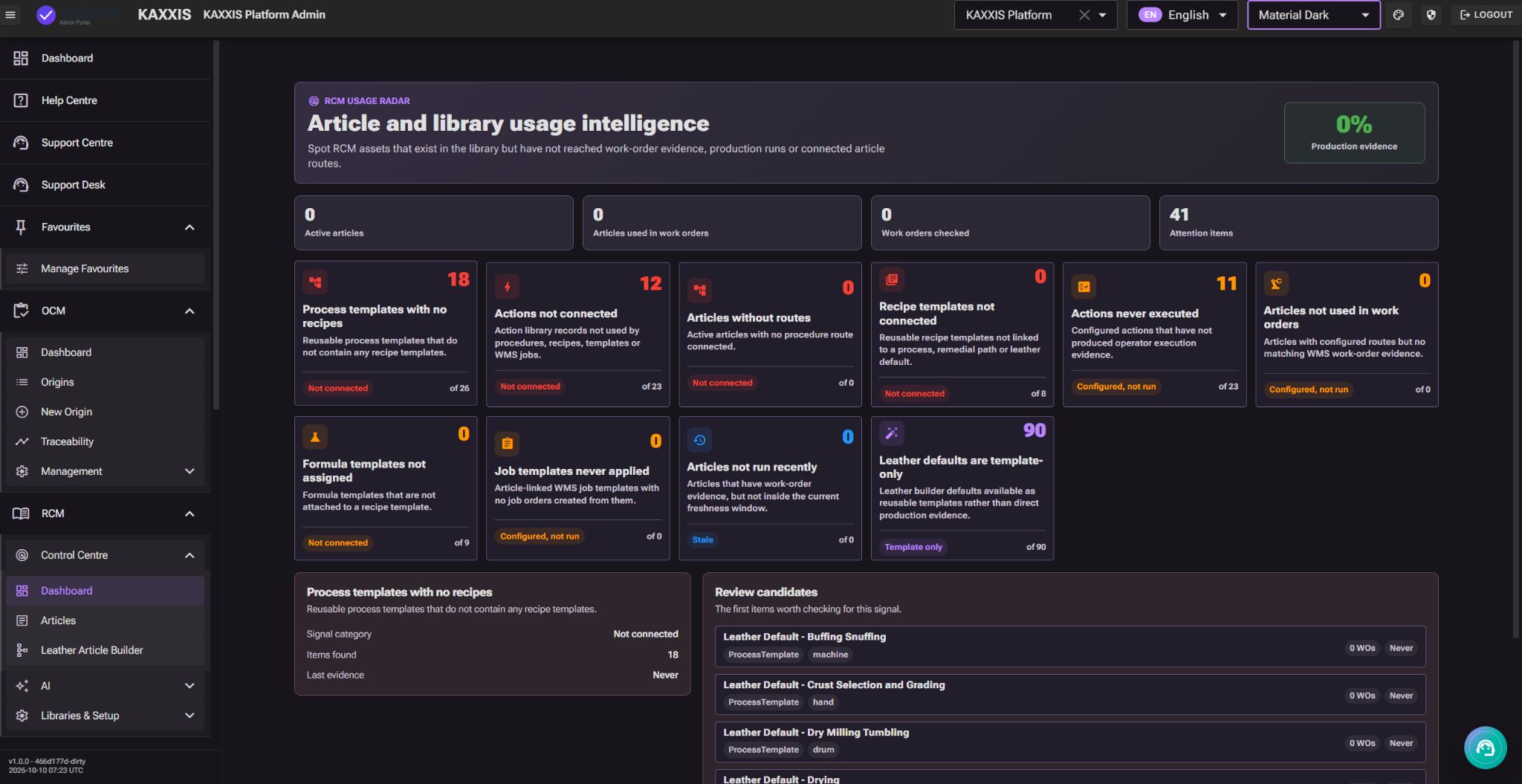
02 / OPERATIONAL INTELLIGENCE
Make the next action visible.
Usage metrics, attention signals and review candidates turn stored records into a working view of the operation.
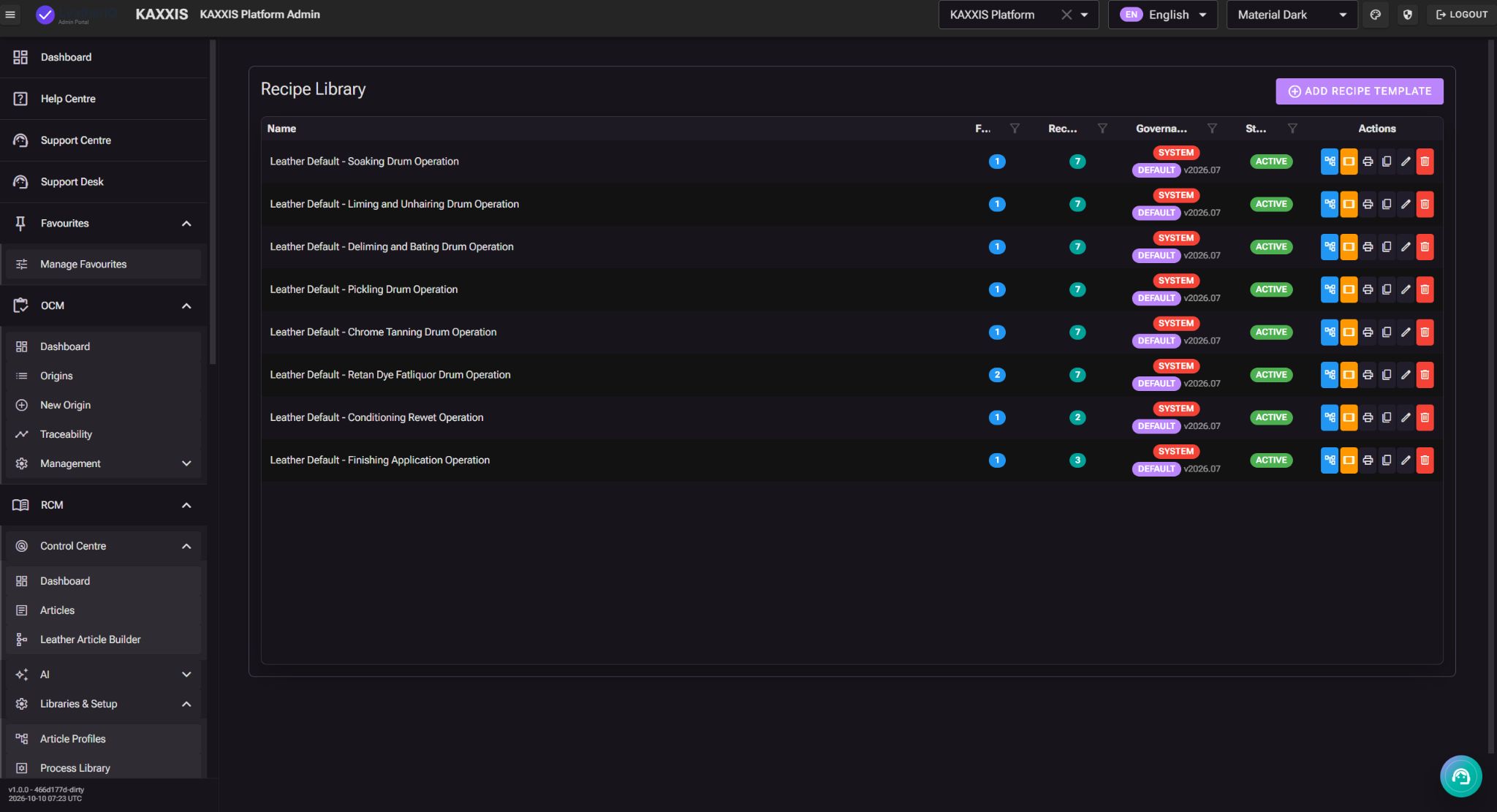
03 / BUSINESS DATA
Give detail room to work.
A recipe library with structured rows, status badges and contextual actions. The everyday tools people use to manage a real business.
MAKE IT YOURS / LIGHT & DARK
Same platform.
A different feel.
Explore the same LeatherIQ dashboard in two actual KAXXIS themes. Shared styling gives your modules a consistent starting point, while you concentrate on their business functionality.
MATERIAL DARK
MATERIAL LIGHT
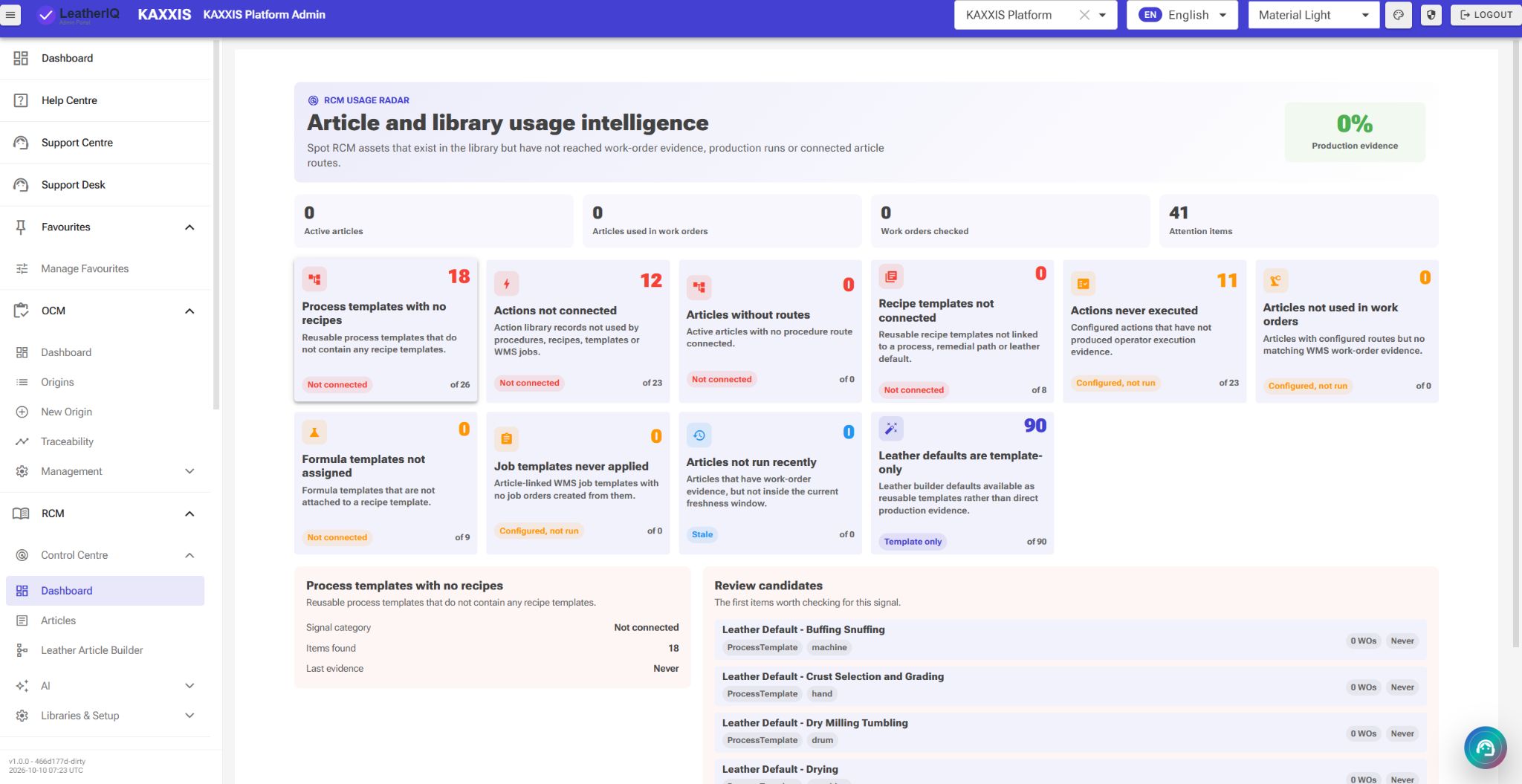
Real LeatherIQ demo-environment captures, October 2026, including the KAXXIS header and navigation. Screens show demonstration values and may differ from your release. LeatherIQ is a separate product; its industry modules are not included automatically with a KAXXIS platform licence.
EXPLORE THE FOUNDATION
See the breadth.
Then build something useful.
Explore the platform in detail, or follow a concrete AI-assisted module workflow from a local environment to your next release.
The full platform catalogue
Customer management, permissions, module tooling, release controls, shared navigation, themes, support and internationalisation—with practical scenarios and clear responsibilities.
From an AI brief to a module
Give Codex or another coding agent the KAXXIS kit and a service-request brief. Follow setup, build, tenant-aware APIs, tests, installation and a version 0.2.0 upgrade.
Built for more than one language
Shared language selection, saved preferences and terminology capabilities give compatible modules a multilingual foundation. See how to add and review English/Italian labels, dates and validation messages.
FREE & COMMUNITY MODULES
A head start.
Built together.
Start with Community CRM, download its source and turn a useful starting point into your own business application.
Download and install
Versioned KAXXIS module packages with compatibility details, release notes and checksums.
Adapt the source
Community CRM includes MIT-licensed source. Build on it with your coding assistant; platform and dependency terms remain separate.
Share your work
Submit a module for administrator review. Discover releases, read moderated ratings and keep track of updates.
THE PLATFORM ADVANTAGE
More of the hard work.
Already in your corner.
Six areas of platform capability. Thirty practical features. See what KAXXIS provides, how you can use it, and where it saves you building the same things again.

Built to serve customers ↗
Serve customers without building a separate application foundation for each one.

Access you can administer ↗
Use shared account controls while you focus on the permissions your product needs.

A better starting point for AI ↗
Give a coding assistant a defined module to build and a concrete contract to work against.

Tools for the life of your app ↗
Start with administrative tools around the application as well as the application itself.
01 / Built to serve customers
A shared foundation for every customer you bring on board.
Your product may be unique, but organisations still need accounts, administrators, branding and access to the products they have licensed. KAXXIS puts those capabilities in one place, so your modules can concentrate on the service you sell.
Picture it: give a new customer their organisation, users and branding, then enable the product they need—without creating a separate application codebase.
Multi-tenant platform
Manage customer organisations within one platform.
WHY IT MATTERS
Reuse one application foundation as your customer base grows.
Tenant and user administration
Manage organisations and their user accounts through platform screens.
WHY IT MATTERS
Avoid building routine customer administration from scratch.
Tenant branding
Configure customer logos, labels and background imagery.
WHY IT MATTERS
Give customer environments their own identity without maintaining a separate UI fork.
Product access and licensing
Control access to enabled products through platform entitlements and licence checks.
WHY IT MATTERS
Make product availability an administration decision rather than a custom code change.
Plans and subscription records
Manage plan configuration and subscription state.
WHY IT MATTERS
Start with the structure for commercial access; payment collection and billing integrations are separately scoped.
02 / Access you can administer
Put the right people in front of the right functionality.
Account security and permissions are part of operating a business application, not a finishing touch. KAXXIS brings the account controls and a common access model together so administrators can manage access and developers can connect their modules to it.
Picture it: define the permissions for a custom operations module, use platform roles to grant access, and apply an MFA policy to the accounts that need it.
Sign-in and account recovery
Platform login, password changes and password-reset flows.
WHY IT MATTERS
Avoid creating a new account-management experience for every module.
Roles and permissions
Role-based access with declared module permissions.
WHY IT MATTERS
Give people access to the work they need through a shared permission model.
Authenticator-app MFA
Account MFA setup and configurable tenant policies.
WHY IT MATTERS
Add another layer of account protection without building an authenticator workflow yourself.
Verified tenant and user context
The SDK checks identity, tenant, product access and declared permissions.
WHY IT MATTERS
Connect your endpoints to established access checks. Your module still enforces tenant filtering on its own data.
Platform activity logs
Review recorded actions with time, category, user and entity information.
WHY IT MATTERS
Give administrators a place to investigate platform activity; custom business events need appropriate instrumentation.

03 / Your product, in modules
Build the business workflow. Reuse the application around it.
A module can contain the screens, APIs, data changes and background work for a useful business feature. The SDK gives that work a defined home inside KAXXIS, rather than making your team assemble another standalone application for every idea.
Picture it: build a service-request module with a Blazor screen, an API, persistent records and a background job, then deliver it as one versioned package.
Blazor module screens
Add business screens inside the shared application interface.
WHY IT MATTERS
Keep a consistent experience across your modules instead of assembling separate apps.
Starter module generators
Generate a module folder with examples, metadata and build instructions.
WHY IT MATTERS
Start from a working structure rather than an empty project.
Backend HTTP APIs
Register module-owned ASP.NET Core controllers and services.
WHY IT MATTERS
Build the business endpoints your UI and integrations need.
Data persistence and migrations
Own your module data and register migration work through the SDK.
WHY IT MATTERS
Evolve your product data with the module. Database design, credentials and recovery remain under your control.
Background workers
Use standard .NET hosted services for background processing.
WHY IT MATTERS
Support jobs and recurring business work without inventing a separate module execution model.
04 / A better starting point for AI
Give your coding assistant a smaller, clearer job.
AI-assisted development works better with a concrete project structure, examples and boundaries. KAXXIS supplies those starting materials so the brief can describe the business feature you want instead of asking an assistant to design an entire SaaS platform.
Picture it: start from a generated module, ask your preferred coding assistant to extend its workflow, then review, test and package the result with the supplied commands.
AI development instructions
Starter folders include agent guidance and a development prompt.
WHY IT MATTERS
Give an AI assistant project context and boundaries instead of asking it to invent the whole platform.
Your choice of coding assistant
The workflow uses ordinary .NET and Blazor code.
WHY IT MATTERS
Keep the tools your team prefers; AI subscriptions are separate from KAXXIS.
Source-free module development
Develop against the supplied SDK without platform source.
WHY IT MATTERS
Bring in developers and agencies without needing to share the platform implementation.
Working backend example
The backend starter demonstrates UI, API, persistence and a background job.
WHY IT MATTERS
See how a useful feature fits together before extending it.
Build and validation commands
Starter workflows build, validate and package the module; backend examples include persistence, API and job tests.
WHY IT MATTERS
Give developers a repeatable way to check their work. Review and application-specific testing are still required.

05 / A practical path to production
Turn a finished feature into a release you can identify and deploy.
Building a feature is only part of the work. Versioned packages, validation and staged activation give your team a repeatable way to move a module into a compatible environment, with a record of which artifact is being installed.
Picture it: build a new module version, validate its ZIP, stage the update and activate it during a planned restart. Keep the previous artifact available as part of your recovery plan.
Versioned module ZIPs
Package a module with a manifest and declared payloads.
WHY IT MATTERS
Hand over a specific release rather than a loose collection of files.
Compatibility and checksum validation
Package Manager checks compatibility, contents and file hashes.
WHY IT MATTERS
Catch incompatible or damaged packages before activation; validation is not a security review of the code.
Staged installs and updates
Upload, validate and stage a release before a controlled restart activates it.
WHY IT MATTERS
Use an explicit deployment workflow instead of replacing active files by hand.
Independent module releases
Ordinary module updates do not require rebuilding the KAXXIS host.
WHY IT MATTERS
Keep routine feature releases focused on the product you changed; new platform capabilities may require a host upgrade.
Previous-version recovery
Retain prior module artifacts and stage a rollback when appropriate.
WHY IT MATTERS
Have a defined route back to earlier code. Database migrations and data restoration need their own recovery plan.
06 / Tools for the life of your app
Keep supporting customers after the feature has shipped.
Customers need help, administrators need delivery settings, and developers need an environment in which to try their work. KAXXIS includes platform tools around those needs, alongside deployment and implementation options you can agree for your project.
Picture it: use the shared support centre for customer requests, configure a supported email provider, and discuss the operational responsibilities for your own deployment.
Shared support centre
Platform support tickets, conversations, attachments and support-desk workflows.
WHY IT MATTERS
Give users a route to help and your team a shared place to handle requests.
Configurable support AI
Platform support includes AI provider configuration and assistance workflows.
WHY IT MATTERS
Add assistance to the support process when configured; provider usage and product-specific integration are separate.
Email delivery configuration
Platform email services include SMTP and Resend implementations.
WHY IT MATTERS
Reuse delivery infrastructure for supported platform workflows instead of setting it up separately for each one.
Windows and Docker developer previews
Existing preview distributions pair a runtime with development resources.
WHY IT MATTERS
Evaluate the platform in a development environment; the supported release and production setup are confirmed with you.
Self-hosting and implementation options
Discuss a licensed deployment in your environment, with optional custom development and implementation.
WHY IT MATTERS
Choose who builds and operates your solution; hosting, support and delivery scope are agreed in the proposal.
Capabilities shown reflect the current platform and developer previews. Your proposal confirms the supplied release, enabled features and support. Custom modules need engineering review and testing; preview access is not a production-readiness guarantee.
WHY USE KAXXIS?
Put your development budget
into your product.
A useful SaaS needs more than its main feature. KAXXIS gives you the surrounding platform so your team can focus on the work customers actually come for.
Less repeated platform work.
Accounts, customer administration, permissions, branding and support tools are work on every project. Start with those capabilities already in the platform and adapt your modules around them.
A smaller job for your team—and AI.
Give a developer a focused module to build, with an SDK, examples and a packaging command. Spend less effort designing the surrounding application and more on the workflow that makes your product useful.
A repeatable way to ship.
Turn a module into a versioned package, validate it and stage deployment. Ordinary module changes do not need a platform rebuild, so your release work stays focused on the feature you changed.
The saving is avoided work: platform features you can reuse, setup you do not repeat, and a defined release process. The amount depends on your requirements and how closely they fit KAXXIS.
01 / WHAT IS KAXXIS?
The SaaS platform is here.
Add what makes yours different.
Start with a running multi-tenant platform, then add your product as modules. Spend development time on customer workflows instead of rebuilding the application shell, user management and permission checks for every project.
01 / SHARED SAAS SERVICES
A platform for your customers.
Serve multiple customer organisations from one platform. KAXXIS provides the shared Blazor interface, tenant and user management, roles and module access checks. Your modules use those services to deliver their own workflows.
02 / FOCUSED MODULE DEVELOPMENT
Build features as modules.
Use the Module SDK and starter examples to create Blazor screens, APIs, data migrations and background jobs. Develop your module against a defined contract, using your own code or an AI coding assistant.
03 / REPEATABLE DEPLOYMENT
Package once. Install and update.
Build a versioned, installable module ZIP. KAXXIS validates the package and stages installation or an update through Package Manager. Activate it with a controlled restart, then check that your module is ready.
THE DIFFERENCE
Develop your module.
Keep the platform working for you.
Ordinary module releases update your module package without rebuilding the KAXXIS host. Add a customer portal, an operations workflow or a specialist business product to the same SaaS platform.
02 / BUILD → PACKAGE → DEPLOY
From your first module
to a running SaaS feature.
The SDK connects module development to a practical installation workflow. Build and test your feature, produce an installable package, then deploy it into a compatible KAXXIS environment.
YOUR NEXT MODULE
Less platform plumbing.
More useful features.
Give your team—or your AI coding assistant—the SDK, a starter module and a clear feature brief. Build on the shared platform services and release your business functionality as its own versioned module.
Preview access by enquiry. Release availability and supported environments are confirmed with you.
A PRACTICAL WORKFLOW
01. Build your module.
Start from the SDK template. Add your screens, APIs and business logic; test permissions and tenant data boundaries.
02. Package your release.
Run the module build to produce a versioned installable ZIP, with a manifest and compatibility information.
03. Install. Activate. Use.
Upload the ZIP to Package Manager, review validation and stage the install or update. A controlled host restart activates the module; readiness checks confirm the release.
IS IT RIGHT FOR YOU?
A head start for the people
building business software.
KAXXIS is designed for teams that want custom business functionality on a reusable .NET / Blazor SaaS platform.
Agencies & consultants
Use a familiar platform across customer projects. Put more of each engagement into the customer’s workflow, with a consistent module build and handover process.
SaaS founders & product teams
Develop the feature that makes your product worth buying while starting with customer administration, account controls and a module release process.
Businesses with a specific workflow
Get a tailored portal or operations application from your own developers or from us. Your modules run inside an existing platform with shared administration.
Best fit: a team comfortable with .NET / Blazor, or a business commissioning that expertise. Projects needing arbitrary uploaded code to run in a sandbox or no-restart module updates need a different deployment design.
03 / WHAT YOU CAN BUY
License the SaaS platform.
Build your modules—or let us.
The core product is the KAXXIS SaaS platform plus the Module SDK: the software to run your application and the tools to extend it. Bespoke module development is an optional, separately priced service.
EVALUATE FIRST
Developer preview.
Try the foundation
For developers and agencies checking whether KAXXIS fits their next project.
Runtime for evaluation
Module SDK & starter examples
AI-assisted development guidance
Supported setup instructions
BUY THE SOFTWARE
KAXXIS SaaS platform licence.
Production use · by quotation
Get the KAXXIS multi-tenant runtime and Module SDK, with rights to run an agreed production deployment. Build, package and deploy your own business modules on the platform.
Multi-tenant SaaS runtime & Module SDK
Module packaging & installation workflow
Agreed production-use and tenant scope
Defined support & update terms
BUY A FINISHED SOLUTION
Bespoke business software.
Scoped project · by quotation
You commission us to design and build your application on KAXXIS. We agree what it will do, the deliverables, milestones and price before development.
Discovery & agreed specification
Custom modules & integrations
Testing and implementation scope
Training and handover as agreed
Source code access: separately negotiated for organisations that need to modify the platform itself. It is not included automatically with a runtime licence. Hosting, production readiness, support, licence rights and delivery dates are confirmed in your proposal; custom development and platform licensing are separate line items.
04 / LET’S MAKE IT HAPPEN
Tell us the ambition.
And the budget.
No endless guessing games. Tell us what you want to achieve and what you’re comfortable investing. We’ll tell you what a realistic first version could look like.
05 / GOOD QUESTIONS
A few things worth knowing.
Straight answers before you start.
How do I deploy a module?
Build your module into an installable ZIP, then upload it in KAXXIS Package Manager. The platform validates compatibility and package contents before you stage the install or update. A controlled host restart activates the release. Test against your target environment before production deployment.
Do I need to rebuild KAXXIS for each module update?
Ordinary module changes are released as a new module package without rebuilding the platform host. A feature that needs a new platform or SDK capability may also require a compatible KAXXIS upgrade. Module installation and updates currently require a host restart.
What exactly am I buying?
A platform licence buys the right to run the KAXXIS software in the agreed production environment, together with the SDK and agreed support/update terms. A bespoke project buys the development and implementation deliverables in your proposal. It uses KAXXIS underneath; the proposal identifies the platform licence separately.
Is KAXXIS an AI coding subscription?
No. KAXXIS is the application platform your business modules run on. You can use an AI coding assistant to help develop those modules, but that assistant and its subscription are separate.
Is this “vibe coding” for business?
AI can help you build modules, but a business platform still needs engineering judgement. KAXXIS supplies a foundation and a defined development path. Review, testing and deployment qualification remain part of the job.
Do I have to use a particular AI tool?
No particular AI coding assistant is required. Start with the documented .NET / Blazor module workflow and use a tool that can work with that codebase. Your AI tooling is separate from KAXXIS.
Can you build the solution for us?
Yes. Tell us your workflow, priorities and budget. We can discuss discovery, custom modules, integrations and delivery milestones. A submitted brief starts a conversation; it is not a delivery commitment.
Can I host it myself?
Self-hosting is part of the proposed commercial offer. We’ll confirm the supported release, environment and operational requirements for your deployment. Windows and Docker developer distributions are being qualified; native Linux installation is a later roadmap item.
Are prices and production downloads available yet?
We’re working with early enquiries while release qualification and commercial terms are finalised. Request developer preview access or a scoped commercial proposal using the form above.
THE NEXT THING YOU BUILD COULD BE THE BIG ONE.