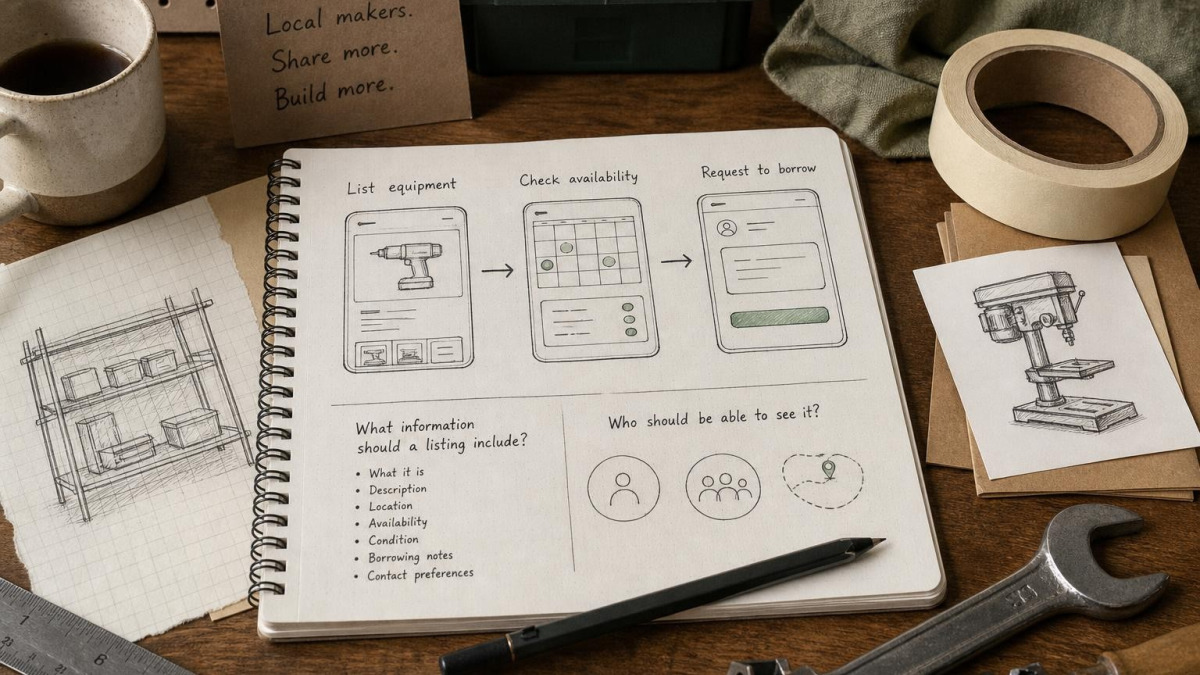
A useful first version for a local maker community
A local gear-sharing app could give makers a simple place to find equipment they need from others nearby. As an illustrative first version, members could list equipment, check when it is available and request to borrow it. These are ideas for an app you could build—not existing KAXXIS features. KAXXIS provides a modular SaaS platform and a build kit for creating and deploying application modules. You can describe the business application you need to an AI, then build the project-specific module with the KAXXIS developer tools. That module supplies the app’s own screens, workflows and data model. The specific deployment scope is agreed in the proposal.
- Start with the core journey: list equipment → check availability → request to borrow.
- Decide what information a listing needs and who should be able to see it.
Make the product decisions before building
LumiCa Labs’ guide, published September 27, 2026, argues that AI-assisted coding does not remove the need to decide what a product should do and how its data should be protected. For a gear-sharing app, that means defining the first-version experience and thinking through who can access each group’s records before asking an AI to help implement it. The KAXXIS developer walkthrough calls for permission checks and tests to ensure one tenant cannot read or update another tenant’s records. If your app serves multiple maker groups, make that separation part of the design and testing plan—not an assumption.
- Choose the first users and equipment category the app is for.
- Write down the listing, availability and borrowing-request steps.
- Decide what each user or group can view or change, then include access checks in testing.
- Explore what you could build with KAXXIS and discuss the application idea.
News sources
- How to Build Production-Ready SaaS with Vibe Coding — published 2026-09-27T07:04:48+00:00
- Lily Ray — published 2026-10-21T02:59:15+00:00
- Marc Lou on X: "Software is having its Uber moment. For years, SaaS companies could keep raising prices because building an alternative was too expensive. AI changes that. Now anyone can enter the market with a competitive pricing. And customers can vibe code a good-enough version themselves." / X — published 2026-10-20T03:29:25+00:00